|
During Morning Startup
The morning you pick up the release, follow these steps:
-
Login as usual. During Morning Start-up on Wednesday, September 4, 2002, your system will automatically pick up the release. (If you're looking at your screen, you'll see your system receive the file "PCX03501.zip.")
-
Click OK to print your report as usual.
-
At the Microsoft Visual FoxPro screen, click OK that your system contains an update, and continue processing as usual. The screen may display a second time. If it does, click OK again.
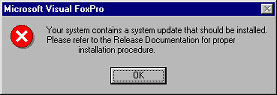
A System Update Acknowledgment Report prints telling you that your system received the file and that the file should be installed.
-
Follow the steps below to install the release.
|

